Top 5 Trends Transforming your Contact Center!

The Contact Center is being transformed at a rate of change that is beyond the ability of current management strategies to identify and react.   Most contact centers are still using 1990 thinking in a 2020 world!  The adoption rate of Smartphones, customer satisfaction scores through social media,  wide availability of video options, and the mobility of customer demographics are terrorizing your call center and what are you doing about it?  Still routing phone calls based on Area Code?   Queueing Callers on more incoming telephone lines, while employing less customer service representatives?  Unless you are Google or the IRS, neither of which cares about customer service, you are about to become extinct!  Here are the top five Contact Center Killers of traditional business models!

(1) Scheduled Call Back  – The traditional strategy for customer retention has been to increase the size of the “catchers mitt” by adding more incoming telephone lines.    Nobody ever says lets increase the number of agents answering incoming calls, but they are always quick to add more incoming telephone lines!   All this does is increase customer frustration, pressure agents to short change the current customer interaction and drive abandoned calls through the statistical roof!   Do not even consider this option until you have explored all the other options listed below!

(2) Mobile Phones –  Without exception, unless your client demographic is that of the Jitterbug generation, your clients are mobile phone users!  This means they have advanced smartphone functionality, SMS or Text capability and they are web savvy!   Tap the functionality of these devices to increase customer satisfaction while reducing over all costs.   Text messages can be used to initiate the Call Back function in  your contact center!   Smart Aps can be created to help clients “self navigate” through your call tree, with the the push of a single button!   Get Smart Phone integration into your contact center yesterday!

(3) Video Support – High “touch” now means Video!   The traditional talk path is narrow, strangles information and is inappropriate for todays high speed, information rich customer contact strategies.  Video offers a deeper and richer personal experience.  When it comes to “show me”, “teach me” and “help me” scenarios, one call completion statistics escalate when video is part of the contact center arsenal of customer satisfaction tools.   Get your Frequently Asked Questions into video format, or risk being ignored by a generation that might be able to read, but find YouTube a faster route to problem resolution.

(4) Social Media – Twitter can do more to damage your reputation than a bad restaurant review on Yelp!  What social media monitoring tools are in your contact center arsenal?  What website integration options have you implemented?   Can your Customer Service Representatives  open a real time video conversation with someone who has hit your website, or just told all their FB friends what the current hold time is in your Contact Center?

(5) Home base agents – did you read (1) above?   The availability of hight speed network connectivity, now makes it possible to tap a labor pool that has nothing to do with driving distance to the office! Quality, trained and experienced Customer Service representatives are out there, living where they want to live and are available to the Call Center that has put distributed workforce connectivity solutions in place.  Down the hall, or across the country, you can provide the exact same supervision, monitoring, and training for a remote customer service representative that you provide for that boiler room Contact Center that you heat, air condition, power and remains your biggest disaster recovery and business continuity challenge!

At DrVoIP we create software integrations that enable solutions for these Contact Center terrorists.    No need to throw out your current ShoreTel ECC or CISCO UCCX, we can wrap these solutions around your existing facilities with rapid deployment prototype options that have high impact and low exploration costs.    Click or Call!
Sending Text Messages to your Shoretel ECC or CISCO UCCX Contact Center?

We recently had an opportunity to create an emergency notification text messaging system for a financial service application built on ShoreTel iPBX and ECC technology. The requirement was to push out text based alerts to individual or groups of ShoreTel phones based on external events. These were typically stock tick updates and very time sensitive! The requirements document also required the ability to send text messages on manually on demand. The text messages would either be created by the Receptionist entering the text into a webpage for transmittal to the select phones or group of phones; or based on the receipt of a SMS text message. The SMS message would be relayed to the ShoreTel Phone API and then passed off to a group of phones for follow up by brokers as required to satisfy the client requests.

We have long contended that SMS application will find their way into the Call Center as triggers to initiate a scheduled call back as alternative to “please hold for the next available agent”. The opportunity to implement such an application was for us very exciting. Smartphones, undeniably ubiquitous, offer the possibility that customer service applications can be developed to enable customers to contact an inside “agent” without having to navigate a call tree! Why increase the number of telephone lines coming into your call center, just to put callers on hold until the next available agent can accept the call? People on hold, are people frustrated. If clients could just send a text message to the call center, targeted at the specific agent group responsible for problem or opportunity resolution, assured by return text message that they will be called at place and time certain, over all costs for all would be reduced and customer satisfaction increased. The concept of “abandoned” calls would be eliminated and real time reports, dramatically redefined!

We invision a Call Center in which there are actually very few incoming lines. The entire call center is based on Agents calling clients back based on agreed to call times defined in an incoming SMS Text message sent from a smart phone or smart phone application. The application, though functionally generic, could be made specific to a company product or service and also include the CRM links necessary for an Agent to service an account when they call the client back at the appointed time. This is a much more stream lined approach to Call Center operations in which telephone lines are optimized, Client service is customized and Agent time maximized.

There are any number of SMS gateways that can be integrated as an internal server or as a subscribed service and combined with the display functions of a ShoreTel phone to enable this scenario. Additionally, Waze can send real time location updates that can also be routed to ShoreTel phone displays. Imagine the application of location based services to SMS text messages out to the display of ShoreTel phones in a call center environment! ShoreTel does an excellent job of documenting the SDK and API interfaces necessary to support this application. In fact the standard API itself is more than useful and is demonstrated in the accompanying video.

Contact us with your ShoreTel application requests especially if they require SMS connectivity to your Call Center!

Slamming it with ShoreTel Call Manager desktop deployment option!

One of the challenges in any ShoreTel deployment is the desktop Call Manager client installation.   You can breeze through the complexity of a ShoreTel multi-server, multi-site deployment only to be foiled when the desktop clients need to be installed or updated.   Nobody wants the thankless task!  As most users do not have Local Administration rights to install software on their desktop machines, the system administrator gets a new task.   So it is either “sneaker net” or an Active Directory Group Policy push out.  Meanwhile, the ShoreTel deployment is otherwise complete!  Frustration as the entire deployment is good to go, but the desktop clients have yet to be installed or updated!  When does the admin team get here?
Now there is a tool out there that makes sense and can be a great help to the field implementation team, charged with getting the ShoreTel system installed, on time and on budget!   Enter the rock stars at AdminArsenal with a very kool software solution named PDQ deploy and put an end to this client install fiasco!   The product makes it easy to do a network based push out of the ShoreTel client, by the ShoreTel installation team as long as they have an Admin account and meet these two conditions: The target computers must be on the same network. This is not an over the Internet install.  The application or patch must support a silent install. Most do, however there are some who do not. The admin must determine what the silent parameter is (/s, /quiet, etc.) to do the push. (Here are package details).
Think if this as a great tool for a deployment in which the ShoreTel implementation team needs to do all the onsite work when they might not have access to the client desktop help desk.   PDQ will let you install MSI files to multiple computers!  If your are a ShoreTel VoIP engineer, you need to add this solution to your tool kit!  Check out a free trial!
Keep those comments comming!

UCCX Cheat Sheet – Agent Log-in in using Extension Mobility!

There is a two step process for logging into the systems if you are a mobile worker.   The first step is to log into a Telephone and make the phone your Extension number.  The Second Step is to log into the CISCO Agent Desktop (i.e. CAD) and make yourself ³Ready² to receive calls from the Contact Center.

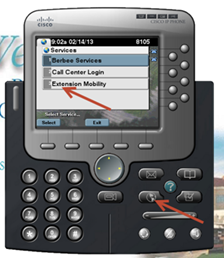
Step One:  – GoTo the phone you are logging into and press the button labeled ³services².  This will bring up a list of Services that your phone supports.  You should one or more services.  Select the Service entitled ³Extension Mobility² by highlighting it with up/down scroll button on phone or entering the menu number.

UCCXphoneCAD

UCCXLogin

Step Two:  You will be prompted to enter your User Name and PIN.   The User Name is your Active Directory (i.e. AD) login name, usually in the form of First Letter of your First Name followed by your Last Name.  For Example, pbuswell.    You will have to use the Touch Tone Pad on the phone to enter your name, and it is a bit cumbersome, but you will figure it out.    The PIN number, unless you have changed it, will be the default of 12345678

The Phone should  wink and blink¹ and reset itself.  When it comes back alive, you should see your Extension number in the Display of the Phone. This means you have successfully logged into the phone on this desk!  Please remember to reverse the process and LOG OUT when you are done.

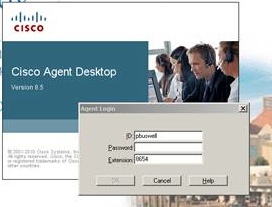
Step Three:  Log into the CAD, by bringing that software up on your associated computer.   This will be a Short Cut on your desktop, or you will find it with your mouse under the Start, All Programs, CISCO, Desktop, Agent.   You will then be presented with a screen that prompts for your User Name, Extension and Password.    Enter your AD user name as used in the above step.  The Extension is to match the Extension on your phone, and the Password is your AD password.

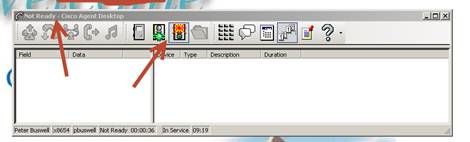
This should log you into the Contact Center and bring up your Agent Tool bar similar to the one below, though your buttons may be smaller.  To indicate that you are READY to receive calls, you will need to push the READY icon (mouse over ICON) to see what they do!   When you do not want to receive calls, you will push the NOT READY icon.  At the top of the tool bar you will note your current Status!

UCCXmakeReady


Deploying VoIP in the Cloud or rolling your own “hosted PBX” – Part 1 Server Deployement

The entire subject of Virtualization and all things “cloud” has become something that even none technical people talk about.    You might say it has gone “viral” and captured the interest of geeks, business people, professional technology managers and entrepreneurs.   Personally, I never did get the whole fascination with hardware.  In my mind hardware was just something we had to put up with to get to play with the software.   When you stop and think about it, aside from the IT folks, nobody wants a Windows 2012 Server!  What they want is a Website,  a CRM package, a blog or a phone system.    Having to deal with hardware was always a chore and it always seemed to me that whatever we had was obsolete within a year or so.   The software could be upgraded, but the hardware had to be “refreshed” an expression that generally means, purchase new stuff!

Virtualization made hardware a bit more interesting.  Now we could at least run a half dozen servers on one huge hardware platform.   Back up and Restore became almost fun!  Now you start adding virtualized appliances like phone systems, gateways and firewalls to the mix and software professionals get almost giddy!     I think VMware has caused more new business creations than any other single “stimulus” package.  Now, even a guy working out of his garage could compete with the big guys!  Capital requirements were significantly reduced and new cloud based business could launch at the drop of a hat and the signing of a sales agreement!   Internet bandwidth, access, creativity and an Amazon account and you were in the revenue production business!
Unless you are in the business of refreshing hardware, why would you want to bother with any of that hardware stuff?   How long does it take your IT team to spin up a new server?   Even if you are a one man show and you can control everything without benefit of a working committee, it takes time to setup a server!   Some organizations take weeks to provision a new server!  Now if you happen to have an Amazon account, even your plain vanilla book buying Amazon account, you could spin up a new Linux or Microsoft Server in about 15 minutes!   With your “Amazon machine instance” you get a security group (read firewall) for your public IP address, a DNS name and a local network all in less time than it takes to unbox and rack a new hardware based solution.The Amazon portal lets you change the configuration of your instance on the fly.  This means you can increase disk size, RAM, change bandwidth and update your firewall without a screw driver!  Think about it, fully operational on net with pubic IP access in less than 15 minutes.

Now that 3CX, ShoreTel, Mitel  and so many others offer Gateways that are “virtual” machines, you could actually spin up a “hosted PBX” in just a few hours!   We though we would try it just for kicks!  Log into AWS spin up a new Windows Sever and deploy ShoreTel or 3CX completely virtualized, including SIP trunks, Border Controllers and Remote phones both Hard and Soft.    Should be hilarious!   (Thanks to winter storms back east, we just brought up a  169 users system, across three states and had the client fully operational in 12 hours from the emergency phone call to the DrVoIP hot line).   This first video clip just deals with provisioning the server.  In subsequent versions we will bring up an entire phone system and you can watch over our shoulders!

ShoreTel Stock Update – Should Mitel and ShoreTel Merge?

Back in the summer we did a blog on ShoreTel from a Shareholders perceptive.    There were a number of issues troubling us which did not seem to make sense and for which we, as outsiders, could not fully appreciate.   Having purchased ShoreTel (NASDAQ: SHOR)  at the IPO price of $10 a share, the stock was trading at about $3 this summer and had not yet found its bottom.    We questioned why Management was in such as shambles with key players jumping ship, many for competitor Mitel.   They were again in the process of doing yet another CEO search and had lost their VP of Marketing and several key sales executives had also migrated over to competitor Mitel (MITL) Corporation.    We were also frustrated at the acquisition of a  “hosted” PBX company that could not even make use of ShoreTel phones.    These were very mixed messages and we were as  you might suspect very bearish on the stock!
Less then six months later many of our concerns were addressed and the stock price at $8.45 seems to have rebounded, but still trades below the IPO price.    ShoreTel now has a new CEO, Donald Joos, promoted from within the ranks, and with considerable credential.  Today they announced that they had filled their long vacant  VP of Marketing role with that of Mark Roberts, a former Mitel Executive, no less!   (Mitel responded by announcing that it had hired 15 year ShoreTel Vertical Sales Executive Chuck Grogman as it’s new VP of Contact Center Sales).  Aside from the obvious revolving door relationship between the executive suits of both companies, we believe these were smart moves for ShoreTel to make.   ShoreTel has achieved new 52 week highs with a stock price of $3.25 – $8.45 and a Market Capitalization of $490M.   By Comparison, Mitel has had a stock price of $2.80 – $9.85 and a Market capitalization of $528M.   Both companies operate in the same space, use the same distribution channel and both offer hosted alternatives to their CPE product lines.
ShoreTel has introduced a new family of end points, or telephone sets that are sip enabled.  This should make it possible for their hosted subsidiary to stop offering CISCO handsets!   We expect a future ShoreTel iPBX software version to further blur the distinction between CPE and Hosted products, with ShoreTel able to offer both.  Look for the new ShoreTel Version to be 1.0 not Version 15!  We suspect that the dealer channel is a bit confused, having bitterly fought “hosted” with a CPE offering.   Now with an entire new distribution channel opening through the former hosted companies sales partners,  ShoreTel branded solutions are being offered by other than the traditional VAR channel.   We also track Ring Central (RNG) and 8X8 (EGHT), both publicly reporting  companies in the pure hosted space, to cross reference both ShoreTel and Mitel performance.
Over all, the prospects at ShoreTel from a Shareholder perspective are looking much better at the end of the year than they did at the start of the year.    The CPE market will undergo continual pressure from the growing homogenization of technology through the adoption of SIP based technology.   Even giant CISCO seems to be positioning SIP ahead of SCCP as  the protocol of choice thanks to Jabber!  The adoption of SIP will continue to drive down component hardware parts like Gateways and Handsets and is the primary reason we would like to see ShoreTel get out of the hardware business all together!   ShoreTel should focus on building a scalable software technology that integrates with as much hardware in the market as can be standardized!  At this point, we recommend ShoreTel as a hold with vigilant monitoring.   You should keep a close watch on both Mitel and ShoreTel as well as monitoring Ring Central (RNG) and 8X8 for hedges and comparison in the hosted space.   The entire sector will be undergoing an upheaval over the next year, so look for more mergers and spin offs to rule the market!
We welcome your comments and remind you that this is just our opinion!


WebRTC to change the Contact Center For Ever! Enter Amazon Mayday Button!

Last month we wrote that we believed that webRTC had the potential to change the business communications landscape forever especially as it related to contact centers!  Little did we know that in less than a month, Amazon would do just that with the introduction of the “Mayday” Button.    The Mayday button does just what webRTC is destined to do, embedding a real time, text  audio and visual communications channel within a web browser!   Technical support will never be the same and as we previously proposed, neither will the Contact Center be the same!   Customer Service is about to be redefined and Amazon seems to be leading the way with the absolute first mass implementation of a webRTC application.

The button, a LifeSavior Icon, appears on Amazon’s new Kindle Fire.  Push this button and a dialog box opens with a real time video image of your technical support consultant.   You can see him, but he can not see you.  He can hear you and remotely operate your device, trouble shooting your issue and “show you how” to do a troublesome operation.   If you can not “see” the impact of this game changing technology, you most likely did not see the internet or the tablet market developing either!

What is so amazing about the technology is that the core elements for implementation are readily available.   This is not and R&D project, but more of an integration of currently available technologies.   WebRTC requires a modern  browser but does not require any plug-ins, usernames, passwords or downloads.  This technology will make peer to peer video pervasive and make establishing real time video teleconferences as easy as clicking a link!   One can only hope that Microsoft will for once, just embrace the technology and skip the always painful promotion of some other “not invented” here model like CU-RTC.

Historically, Call Centers were places that you “called” from your home phone.   Now we understand the immediacy of Contact Centers which treat email, chat and sms as readily as phone calls.  Contact Centers understand that the “home phone” is now a mobile device and there is an entire generation of customers who have never had a “land line”.      It does not take a market visionary to see the “high touch” ramifications of a video interaction and the inevitable impact it will have on the “customer service” paradigm.   Adopting video on demand or “click for support” options in the call center is not an option, it is an imperative and will quickly impact the market by segmenting customer service as quickly as new technologies buried the Polaroid!

We are now integrating webRTC Call Center applications either as an appliance or as a cloud in the form of InstaVoice, FACEmeeting, TokBox and Tawk.   Clearly, some customer service applications are more visual and can benefit more immediately than others by adding a video component.  Clearly, technical support or instructional  applications are at the top of the list.   Can American Express be far behind. Are you more likely to interact with a credit card company representative you can see in addition to hear?   (We can only guess at what the HR impact will be on Contact Centers that adopt webRTC, but that is another topic and also worthy of discussion).

We would welcome the opportunity to discuss the concept of webRTC within the context of a real contact center application, so call click or email!   You will be “seeing” a lot more of this from DrVoIP and others, so stay tuned!


UCCX Scripting – Working with XML documents

When writing call control scripts for Contact Centers (ShoreTel ECC, CISCO UCCX ) do you really have to start over each time?   Are there really that many differences between contact center applications?    Well, yes and no!  As we continue the search for the killer script, that “holy grail” of scripts which can do it all and never needs to be modified, we turn our attention to the wonderful world of XML!    Every Scripting Engineer has a library of routines that hey have emerged over time.  They accumulate over as the scripts become more refined with time and experience.   You would think there would be nothing new under the sun, but from time to time someone hits on a particularly creative solution to a common call flow requirement.

I have to credit Steven Griffin, a true rockstar of a  software engineer,  with opening my eyes to the possibility of using a “QueueOptions.xml” file to specify parameters you might otherwise hard code in a UCCX call control script.  I have learned from other engineers like Wesley Forvergne and Anthony Holloway how to build on this concept (these guys have all really advanced the state of the art IMHO)  and create scripts that are extensible, supportable and flexible!  Why have to write another script or launch other instance of a script just because the SLA, Menu or Schedule changed?  Why not have a Script that can reconfigure itself based on parameters recovered from a configuration file, using DNIS as the file index?   An inbound call to the contact center triggers a script which uses the DNIS to look up the appropriate configuration for the number dialed.

Maybe this DNIS differs from another DNIS only in as much as the On hours specified  in the Schedule?  If you have been using that “Day of Week” and “Time of Day” UCCX script step you have no alternative but to have either a bunch of “if” steps or creating the same script on another trigger so that you can have a different operating time.  What an inefficient waste of processor and system resources!   Why not just read in the Schedule from an XML file and use the same script for all your DNIS numbers, all on the same trigger?  You can even reconfigure the Menu and Prompts, change the voice mail box, determine if you should play “estimated time in queue” or not and just generally customize the script on the fly!

XML is just a powerful alternative to OBDC type solutions.  No special drivers, portable across operating systems, language independent and able to handle dynamic database changes.  Your XML document can be updated dynamically as required through HTTP and other web based technologies.  This makes it possible  to integrate your call flow based on input from a website entry!   How about SMS to XML?  Think of the possibilities!   I guess that is what we really enjoy about Contact Center scripting!  Never a dull moment and limited only by imagination.

The video discusses the creation of an Xpath specification assembled on the fly and uses a string value to index the XML document.   Great entertainment and fun for the entire family!


WebRTC, ShoreTel ECC and CISCO UCCX?

What is WebRTC?   Think of it as a teleconferencing system built right into your browser!   For some time now, call centers have been slowly integrating web chat functionality into the call center tool set.   Visitors to the company website can click on a link and open a chat or “IM” session with the next available agent.  This is a very powerful tool addition when properly implemented, but it reduces the communications process to a the linear, sequential medium of typing.  Not much different than a email with the possible exception that you can “share a form” on the website between the agent and the web visitor.    Some websites have voice enabled chat links and “click to talk to a customer service representative” usually results in a call back.   Why not click and open a real time voice and video link with the call center?   It is very possible to do this, but almost impossible without having the web visitor download a special “plug- in” and having proprietary voice gateways on your call center.


This is where WebRTC can play a major role in “peer to peer” communications.  DrVoIP believes this technology has the capacity (excuse the pun) to redefine the communications landscape.  Using WebRTC users are able to establish a real time voice and video communication channel without having to download an special software, or create a special user account!  WebRTC leverages the recent trend in which the web browser IS the “application” and facilitates browser-to-browser communication, with no software downloads or registration needed. The web browsers themselves include all the capabilities needed to support real time  voice and video communications. WebRTC standardizes communications between browsers, enabling audio and video communications, and data bridges to support text chat or file-sharing.  For this reason it is an ideal solution to to enable customer care solutions that desire direct access to the call center!


Imagine your prime demographic prospect or client browsing your website from and Droid or IPhone and being able to open a real-time voice and video interaction with your call center based agent or representative!  Talk about “point of sale”!  The client no longer has to search for a call center number, or wait for a call back, but seamlessly adds a human sales or customer service resource within their current search reality!    Chrome and Firefox have stable releases and others are quickly moving to address the emerging webRTC standard.   Yes, we have the technology today to implement “person to person” communications models  within the contact center,  freely mixing the media streams from webRTC with the PSTN and SIP media streams already coming into your call center!


We used to say “never trust anyone over thirty” and that still seems to be the case.  To many “old” people running call centers!   There is a generation of folks out there that have never had a wire based phone,  don’t want one and live in the very mobile world of ‘instant gratification”. They have been raised on wireless smartphones, the internet and “faceTime”.  Much the way the broadcast television industry has been crushed by Video on Demand, YouTube and Netflix, your call center will be crushed if you don’t begin to understand the fundamental shift in communications technology that is reshaping the global business communications landscape.   DrVoIP believes, the American Business communications landscape will be littered with the bleaching bodies of those call centers that fail to adopt WebRTC!

A Cure for the common Hold?

The Symptoms  – Help!  My on-hold recording warbles like a wounded canary!  If your customers are kvetching over the aches and pains of listening to your wobbly, distorted on-hold recordings, it’s time to seek medical help.

The Causes – The growing number of professionals who conduct business on the move is part of the affliction, along with the rapid exodus from traditional landline phones to more mobile technologies that rely on the strength of broadband to function.

To cope with the massive communications overload, cell towers are constantly switching between multiple cell phone conversations every second, which can make recorded music sound wobbly, distorted and the speech content almost impossible to understand. It’s an epidemic. And, depending on how busy the local towers are with calls, they’ll reproduce music reasonably well when call traffic is very light. Other times, because of heavy traffic or poor reception, the on-hold messages themselves will sound freakin’ awful.

The Cure – On Hold Advertising has the Rx for the common hold and will make your recording sound awesome! We custom produce all kinds of voice media with no music, just highly professional voice talents. Or, we can spice it up with catchy rhythmic backgrounds specially created to workaround the nuances of cellular connections.  For more tips on making the most of telecommunications marketing to keep your customers happy, and maybe a little less insane, visit us at onholdadvertising.net.