Building an “Appointment Reminder and Phone Tree” using Amazon Connect!

The Phone Tree Concept

Phone Tree’s are have a wide range of use cases from emergency notification alerts, to social function meeting announcements and even appointment reminders!   The generic functionality of this “Phone Tree” application, however, is similar in each use case.  Generally, we want to place an outbound phone call to numbers that are in a database, play a recorded announcement, prompt and collect digits, update the contact list and even allow the caller to be transferred to a live agent, BOT or message center.

Example Application: meeting alert and dinner reservation!

In this example we want to contact all the members of the club and inform that that a dinner meeting is planned for a specific data and time.   We want to know how many members will attend both the dinner and the meeting.   The recorded announcement might be something like ‘The White Hat Hacker club will meet this Friday evening at the clubhouse at 7PM.  Dinner will be served at 6PM and a reservation is required.  Please press 1 if you are planning to attend the meeting and the dinner, press 2 if you are attending the meeting only, or press 3 to indicate you will not be in attendance at this meeting”.     We also want to report the results of this survey to the meeting management via an email when all contacts have been notified.

This functionality could easily become an appointment reminder for a medical clinic.  The clinic wants to alert all patients that have an appointment for tomorrow to be reminded of that appointment.  This would use the same Phone Tree application and work the same, but the message might be a bit different: “This is Doctor VoIP’s office reminding you that you have an appointment tomorrow. Please press 1 to confirm the appointment or Press 2 to speak with a scheduling co-ordinator”.

Basic Configuration elements:

To get his application working we are using two major contact flows, a dynamoDB table containing the numbers to be dialed and three lambda functions.  The lambda functions include the outbound dialer API, the reset database and the update database functions.   The contact flows are used to validate the credentials of the dialer administrator, reset the database for fresh calls and to initialize the dialer function.  The second contact flow is the contact flow that plays the outbound announcement, prompts and collects digits and then updates the database.

  • DynamoDB Table – Minimally the table contains the number to be dialed and the status code.  The dialer looks through the table list for entries that have a status code of zero.   The table is updated with a new code based on the digits collected from the caller, or it marks the table with a status code of 3 to indicate the caller was contacted but did not enter any digits.
  • Lambda dialer function ( DrVoIP-InitiateOutboundCampaign)  (i.e.  – reads the database and once the caller is dialed, transfers the caller to the contact flow that plays the announcement and collects the responses.
  • Update database function – each phone call requires the database status code to be updated,
  • Reset the database to zero  function – Sometimes the list may be used more than once.  For this reason we want to clear the current status code before initializing the dialer. Clearing the database resets all entries to a status code of zero.
  • Contact flow Authorize Dialer – this is a simple contact flow that first asks the caller to input their ID number and PIN.  This is done to validate the caller is authorized to initialize the dialer.  Once validated, the application asks the caller to press 1 to initialize the database to zero or press 2 to initialize the dialer.   Pressing 1 launches the reset database function to mark all entries with a zero status code.  Press initializes the dialer and enables all entries with a status code of Zero to be contacted.
  • Contact flow Announcement – this simple contact flow plays the announcement to the called party and prompts them to enter a digits in response.   The digit is used by the update database function to set the status code equal to the digit entered by the caller.
  • SNS – Simple Notification System is used to send a summary of the dialer results to anyone subscribed to the SNS notification.  In this application we are using SNS to send an email to the meeting managers with a count of dinner reservations!

Improvements?

The application described above, works well and gets the job done!  Sweet and simple, but what can we do to improve this application?   Currently the outgoing announcement is hard coded in a ‘Play Prompt’ contact flow step.   We have the option of enabling this to be a contact attribute that reads in a new prompt each time!  Optionally, we could implement a “record to file” solution enabling someone to call in to the authorization contact flow and record a new announcement!

The dialer database is also manually maintained.  It would be useful to enable either the table to be uploaded or to have a web administration interface so that folks do not have to have access to the AWS Management console to make use of the application.   If you are using a CRM package, it might be better to have linkage to an external database.


Give us a call and we can implement this application or talk about building you a modified version!  – DrVoIP


Amazon Connect Call Center Frequently Asked Questions!

Executive Summary: Why Modern Contact Centers Win

Amazon Connect is no longer just a cloud phone system. With integrated AI, real-time transcription, automated summaries, and intelligent agent assist, it becomes a measurable performance engine.

Organizations that modernize with AI typically see:

  • Reduced Average Handle Time (AHT)
  • Improved agent consistency
  • Faster onboarding of new staff
  • Higher-quality operational data
  • Reduced QA review time

DrVoIP helps small and mid-sized teams deploy or modernize Amazon Connect quickly — with fixed-fee clarity and no enterprise consulting overhead.

Amazon Connect + AI — Built Right

Amazon Connect is AWS’s cloud-native contact center platform. It scales instantly, requires no hardware, and integrates deeply with AWS AI services.

DrVoIP has been building on Amazon Connect since 2017 — including creating Dextr (later acquired by AWS). Today we focus on AI modernization and rapid deployment for practical business outcomes.


What Does Amazon Connect Cost?

Amazon Connect is consumption-based. There are no per-seat licenses. You pay only for usage — voice minutes, messaging, AI features, and optional services.

View Current Amazon Connect Pricing →

We provide usage modeling before deployment so there are no billing surprises.


DrVoIP Fixed-Fee Packages

  • Core Voice Quickstart — Rapid deployment for essential routing environments
  • AI-Enhanced Deployment — Includes transcription, automation, and agent assist
  • 2-Week AI Upgrade Sprint — Improve performance inside an existing Connect instance

Scope, timeline, and deliverables are defined before work begins.


Optional AI Capabilities

  • Real-time transcription & sentiment analysis
  • Generative AI agent assist (Amazon Q in Connect)
  • Knowledge base retrieval with Amazon Bedrock
  • Lex conversational self-service bots
  • Automated call summarization
  • QA acceleration & insight reporting

Schedule a 30-Minute AI Fit Check

We will review your current Amazon Connect setup and identify fast, measurable improvements.


Request AI Review →

Security & Compliance

Amazon Connect runs entirely on AWS infrastructure and meets major compliance frameworks including PCI DSS and HIPAA eligibility. All data is encrypted in transit and at rest. We implement role-based access controls in every deployment.

Amazon Connect – Start/Stop/Pause/Resume voice recording?

Recording and Analytics

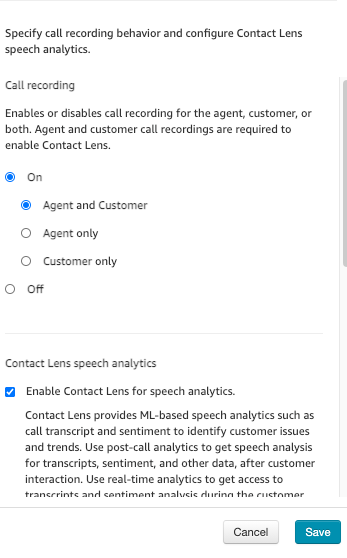
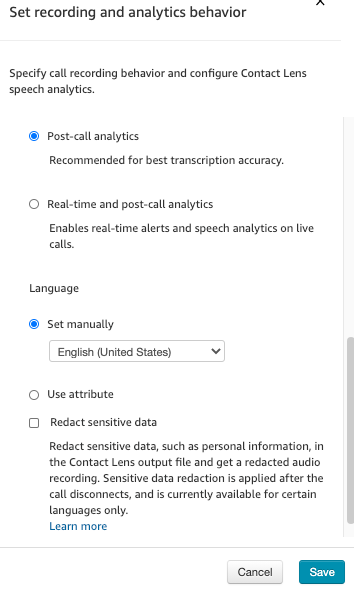
While configuring Amazon Connect contact flows you will find a “SET Recording and Analytics?  step that you can make use of to set the voice recording behavior.   When you set the recording behavior you select recording only one channel or both the Customer and the Agent.

LENS Speech Analytics

In addition to setting the recording behavior you can switch on LENS a transcription and comprehension service.  This service is typical of call centers as they manage to improve Agent performance and customer satisfaction.   You also make a choice between post call transcriptions or real time subscriptions that can be used to alert supervisors to a real time need for interaction.


Start/Stop/Pause/Resume


Often for reasons of compliance  HIPA or PIC for example you might want to turn off voice recording while personal data, like credit card information, is being provide.   To do this, it will be necessary to create an extension to the CCP to enable the buttons need to effect the feature.    The clip below reviews a customized CCP we created to handle several features including the start/stop recording API as published.

Give us a call and let us help you with this requirement!  DrVoIP@DrVoIP.com 


Amazon Connect – Play Pre-Recorded messages to remote Voice Mail?

Recorded Message Use Case

In an outbound  call center an agent may make several hundred phone calls each and every working day.     When the person they dialed does not answer and the call is forwarded to voice mail, the Agent leaves a message requesting a call back indicating who to call and at what number?    The message is most likely very similar for each called party, requiring the Agent to be enthusiastic and engaging for each message left!

Is there a better way?

There is a cheap and dirty way to do this!   Each Amazon Connect Instance has a “Default Outbound” contact flow.   This contact flow is used for all outbound calls even if you do not specify it.  In fact you cant specify it, or an alternative.  Usually in contact flows, you can do a “save as” on any of the sample or default contact flows and then reference them in your own contact flow designs.   The Default Outbound contact flow however can not easily be used n this way.

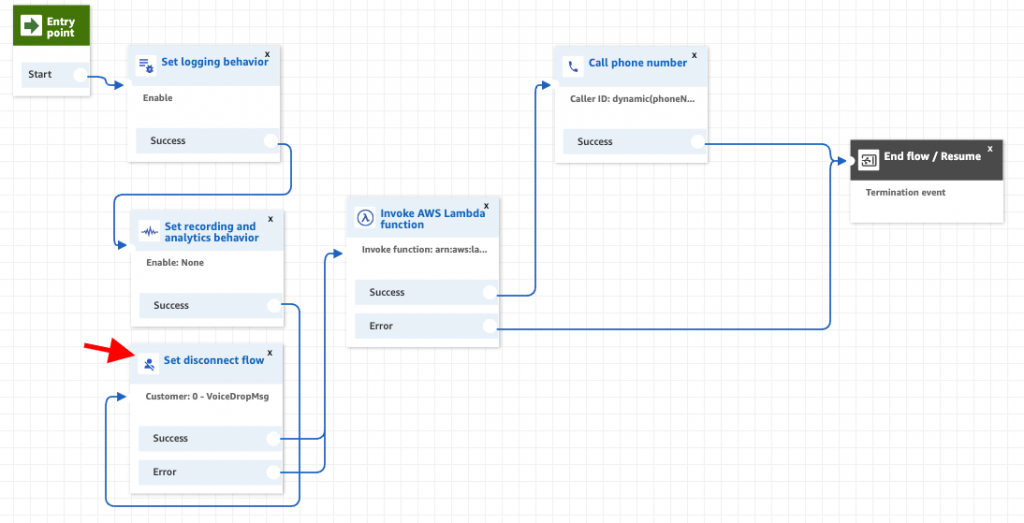
What you can do is modify the outbound contact flow and add a “set disconnect” step in that contact flow.    This step is activated when the Agent hangs up and the outbound line is still up.   In this use case, the “set disconnect flow” point to a simple contact flow that has  “play prompt” which contains the message you want to leave in the called parties voice mail box.  The agent, hearing the call has been forwarded to a voice mail, simply hangs up!  The contact flow then plays the prompt asking for a call back!  Cheap but very workable!   (This is a video clip that reviews this configuration).

Note: The Lambda function in this configuration is to support a different function, that of selecting the Caller ID the agent wants to display to the called party.  You can see the details of that configuration at this link.

How about multiple message play options?

What about enabling the Agent to select from multiple messages?  Can each Agent have their own pre-recorded messages? The use case would be the same as configuration as above, but with a couple of changes.  The first change is we need to create a custom CCP that would have the buttons we need to indicate which message the Agent wants published to the called party.  This might be individual buttons or it might be a drop down list of available numbers.    Secondly, we would need a lambda function to retrieve the messages from a Dynamodb table prepared for this purpose.

The following video reviews how this configuration might work with a customized CCP.

Give us a call or email DrVoIP@DrVoIP.com if we can help you with this function!