
Amazon Connect Transfer to Queue or Transfer to Flow?

When to Transfer to Flow and Why?

A typical call flow might have a caller reach an IVR Call Tree that offers options to reach different departments and workgroups in your company.   “Thank you for calling, Press 1 for Sales, Press 2 for Customer Service and Press 3 for Administration” as boring as it might sound, is a typical call tree self navigation audio instruction prompt.  Let’s assume the caller presses 1 for sales,  do you “transfer to flow” or “transfer to queue”?

Transfer to Flow?

A flow enables  you to string together a number of setup options that customize the callers experience and enable different call handling options.  For example, you may want to reset LENS, change recording behavior, change voicing, set contact attributes and set the queue hold flow.   These options would not be available if your set the working queue and then transfer to queue from the main IVR menu, robbing you of the opportunity to establish a unique caller experience.
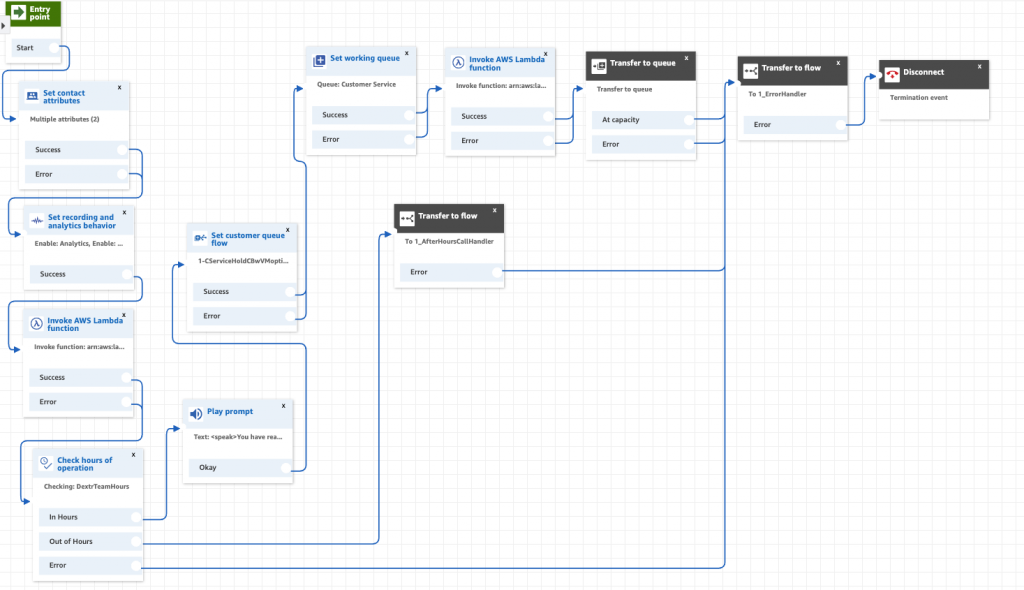
 

Transfer to Queue

You will notice that within the Customer Queue flow, there is not option to transfer to another flow!   There is an option, however, to transfer to another  queue.  You will also notice that this is one of the times you can transfer to queue without first setting the queue!    Assume you have a caller in the “customer service” queue hold flow and periodically you offer them the the option to transfer to another queue.  More likely, you may have a loop in the wait time that after an extended time transfers the caller to a “high priority” queue.

Generally, you will always transfer to flow and only use transfer to queue within the main contact flow or the queue hold flow!

Fun Fact: Brain Teaser Question:   What is the queue hold flow that the caller will be associated  with when they transfer from the “customer service” queue hold to the “high priority” queue using the transfer to queue flow step?



Dextr configures Amazon Connect Voice Call Recording by individual State Law!

To record or not to record, that is the question

It is very common to call into a contact center and he the warning message “You phone call may be recorded to improve customer service”.   Sometimes you might even hear “Press 1 if you do not want your call recorded”.    Each of the States has a law governing the recording of telephone calls.  In some states, only one party in the conversation must consent to recording.  In other states, both parties must consent to the recording.

One-Party Consent States

Alabama, Alaska, Arizona, Arkansas, Colorado, District of Columbia, Georgia, Hawaii, Idaho, Indiana, Iowa, Kansas, Kentucky, Louisiana, Main, Minnesota, Mississippi, Missouri, Nebraska, New Jersey, New Mexico, New York, North Carolina, North Dakota, Ohio, Oklahoma, Rhode Island, South Carolina, South Dakota, Tennessee, Texas, Utah, Virginia, West Virginia, Wisconsin, Wyoming.

All-Party Consent States

These states clearly or potentially require consent from all parties under some or all circumstances:

California, Connecticut, Delaware, Florida, Illinois, Maryland, Massachusetts, Michigan, Montana, Nevada, New Hampshire, Oregon, Pennsylvania,  Vermont, Washington

Note that in many states, consent requirements only apply in situations where the parties have a reasonable expectation of privacy (e.g. not in a public place). Further, what constitutes “consent” in a given jurisdiction can vary in terms of whether it must be express or can be implied based on the circumstances.

When and How to Control Contact Center Recordings?

Dextr will compare each incoming phone number, extract the area code and map the area code to the State that matches that area code.  Based on the state law, Dextr will reconfigure your recording to either be “Agent only” or “Agent and Customer”.  You have the option of playing  prompt to the caller that indicates the status of your recording.  This option can easily be applied to both inbound phone calls and outbound phone calls!

Save 80% on Amazon Connect Design and Deployments

We build Amazon Connect Call Centers, Chat Bots and Speech Recognition based customer experience management solutions.  We do this for a fixed price, on time and on budget using Dextr the omni-channel wrapper for Amazon Connect.  Dextr enables you to significantly reduce the cost of design and deployment!  Give us a call at 800-946-6127 or email us at CustomerCare@Dextr.cloud – DrVoIP


What exactly is a Contact Trace Record?

Exactly what  is a CTR?

Amazon Connect creates a “contact trace record” with a unique “contact ID” for each phone call in or out of the contact center.   Older legacy telephone folks would call this a SMDR or CDR (station message detail record or call detail record) but Amazon calls it a CTR.  The end result is the same, it is a record of the details of every call made or received into the system.    From within Amazon Connect you can search for these contact records through the dashboard in 14 day increments and review the details of each record.   Amazon keeps the CTRs for 24 months in a secret location that you can not access and for which no API currently exists!    You have two options:  First, search for them using the dashboard in 14 day increments  or setup a kinesis stream and a consumer to send CTR records to an S3 bucket or some other data lake for later review.   The basic CTR is ugly but it does have a great deal of useful data and all the more reason to make it more easily accessible!  Even if you were to save the CTR records you would then need to write a custom report generator to take this data and make it human readable to fit your reporting goals!

Dextr has an Activity screen that captures all of this information and makes it available in human readable format!