Cloud & Virtualization Migration

AWS, VMware, or Hyper-V. We Help You Decide, Then Build It.

AWS, VMware, and Hyper-V migration support.

"Cloud" isn't one decision. It might mean moving everything to AWS, virtualizing what you already run on VMware or Hyper-V, or a hybrid of both, keeping some applications on-premise while your web, email, and database servers run in AWS. DrVoIP was virtualizing communications infrastructure on ESXi years before it was a supported configuration, and moved its own practice exclusively onto AWS in 2017. We help you pick the right infrastructure for what you're actually running, then migrate you onto it without a big-bang cutover.

2011
Virtualizing contact center infrastructure since
2017
AWS-exclusive migration practice since
3
Real paths we recommend from: AWS, VMware/Hyper-V, or hybrid
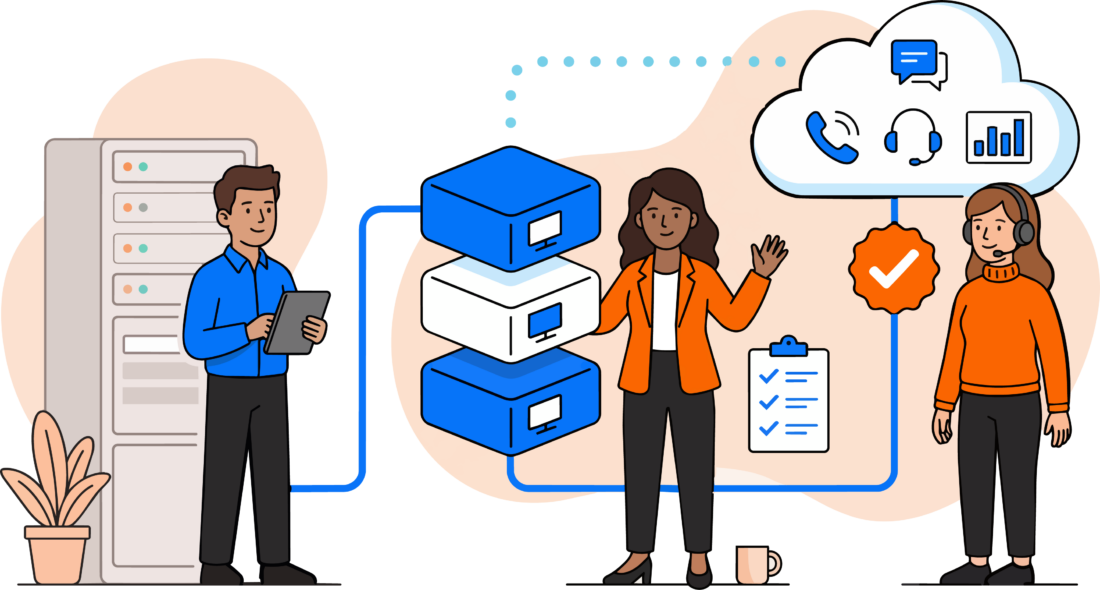
On-premises infrastructure migrating to AWS cloud with VMware, Hyper-V, and elastic compute

Standard Consulting Partner since 2017

What Migration Actually Covers

Six disciplines, whichever path you take

This is the real service list we scope engagements from, not a generic "we do cloud" slide.

Data Center Migration to AWS

Moving servers, applications, or your entire data center onto AWS's elastic compute model.

VoIP & Systems Migration to VMware vSphere

Moving core communications servers onto the VMware vSphere ecosystem for redundancy and high availability.

ESXi Design, Configuration & Management

Host platform sizing, configuration, and ongoing management for a VMware or Hyper-V environment.

Elastic Compute & On-Demand Scaling

Spin up capacity when you need it and scale back down, instead of provisioning hardware for peak load year-round.

Hybrid Architecture & VPN Connectivity

AWS and on-premise infrastructure connected by VPN, built to work as one environment, not two.

On-Demand Technical Support

Problem resolution and troubleshooting for whichever platform your infrastructure ends up on.

Virtualization Isn't Optional Anymore

  • Cisco Collaboration is now only available in a virtualized environment, not a future option
  • Virtualization increases redundancy, high availability, and disaster recovery for core communications servers
  • AWS elastic compute lets you expand or contract capacity on demand instead of provisioning for peak load year-round
  • A hybrid model is common: web, email, and database servers in AWS, applications still running on-premise

Two Real Paths, and a Third

AWS, or VMware/Hyper-V? Here's how we help you decide.

There's no universal right answer, only the one that fits what you're already running and where you'd rather spend your time. Here's the real tradeoff, not a sales pitch for either side.

Virtualize On-Premise (VMware / Hyper-V)

  • You keep control of your own hardware and data center
  • Redundancy, high availability, and disaster recovery built in through vSphere or Hyper-V, without new hardware for every server
  • Cisco Collaboration requires a virtualized environment now, this path is often not optional anymore
  • Makes sense when compliance, latency, or existing capital investment keep you on-premise

Move It to AWS

  • Elastic compute: expand or contract capacity on demand instead of provisioning for peak load year-round
  • A shared responsibility model: AWS manages the infrastructure, your team still manages what runs on it
  • Ideal for business continuity: spin up recovery capacity without owning a second data center
  • Makes sense when you want to stop managing physical hardware refresh cycles altogether

Most real deployments land somewhere in between: web, email, and database servers running in AWS, connected by VPN back to applications that stay on-premise. We design the hybrid split, not just push you toward one side of it.


How An Engagement Runs

Assess, design, migrate, support

The same sequence whether the destination is AWS, VMware, Hyper-V, or a hybrid of the three.

  1. 1

    Assess

    We review what you're running today, existing hardware, VMware/Hyper-V readiness, or what's already in AWS, before recommending a path.

  2. 2

    Design

    Architecture decisions made before migration starts: full AWS, on-premise virtualization, or a hybrid split, sized to what you actually need.

  3. 3

    Migrate

    Servers move in parallel with production, a P2V conversion or a direct AWS data center migration, whichever fits your design.

  4. 4

    Support

    AWS Managed Service or ongoing VMware/Hyper-V support after go-live, because infrastructure needs maintenance long after migration day.

Talk It Through First

Schedule a Cloud & Virtualization Fit Check

Tell us what you're running today, on-premise hardware, VMware, Hyper-V, or already in AWS, and we'll tell you honestly which path actually fits.


Proof, Not Hype

Migrated, not just recommended

How this actually ships, not a theoretical architecture slide.

Real Depth

Virtualizing infrastructure since before it was a supported configuration

DrVoIP was running contact center infrastructure on VMware ESXi as early as 2011, years before virtualization was an officially supported deployment, because clients needed the redundancy it provided.

Real Discipline

Hybrid architecture, not an all-or-nothing cloud pitch

Host your web, email, and database servers in AWS while your applications stay on-premise, connected by VPN. We design the split that fits what you're actually running, not a one-size-fits-all migration.

Certifications

AWS Certified Generative AI Developer – Professional badge
AWS Certified Machine Learning Engineer – Associate badge
AWS Certified AI Practitioner – Foundational badge

“DrVoIP and team are very knowledgeable on AWS and specifically in our case the Connect product. The cost savings of moving to AWS Connect has been huge.”

Sean KennedyIT Manager, FMG Suites

“From watching his YouTube videos, we engaged Peter on numerous contact center projects, including migrating a portion of our Cisco UCCX contact center into AWS.”

Amir SafayanReal Estate Entrepreneur

“I highly recommend DrVoIP to anyone interested in obtaining fast responses and solutions to problems around the creation of a modern AWS Connect phone system.”

Mickael SebbanFounder, Oui Systems

Where This Fits In What We Build

Infrastructure migration isn't a separate product, it's one of six disciplines

Cloud and virtualization work sits alongside the rest of Cloud Services. Here's exactly where it connects.

Migration From Legacy Systems

Moving your phone system platform, not just your infrastructure? See the warm port cutover method.

Explore ›

Why Cloud Services

See how infrastructure migration fits with network engineering, security, and custom software.

Explore ›

Network & Security Hardening

VPN and firewall architecture for the hybrid connectivity this migration depends on.

Explore ›


Common Questions

Frequently asked questions

Migration From Legacy Systems is about your phone platform, moving off ShoreTel, Cisco, or another vendor onto Amazon Connect using our warm port method. Cloud & Virtualization Migration is about the infrastructure underneath: where your servers actually run, AWS, VMware, Hyper-V, or a hybrid of both. The two often happen together, but they're different decisions.

It depends what you're optimizing for. AWS fits if you want to stop managing physical hardware and scale capacity on demand. Staying on VMware or Hyper-V fits if you need to keep control of your own data center for compliance, latency, or existing investment reasons. Most clients land on a hybrid of both, and that's the conversation we have first.

Hybrid is common, not an edge case. A typical split is web, email, and database servers running in AWS, connected by VPN back to applications that stay on-premise. We design the split around what actually needs to move.

No. Whether it's a P2V conversion to VMware or a data center migration to AWS, the work happens in parallel with what's already running. Nothing cuts over until the new environment is built, tested, and proven.

It starts with an assessment of what you're running today, then a design for what moves to AWS, what connects back over VPN, and what stays put. Migration happens server by server or in planned batches, not one risky weekend cutover.


Further Reading

More on cloud, virtualization, and infrastructure migration

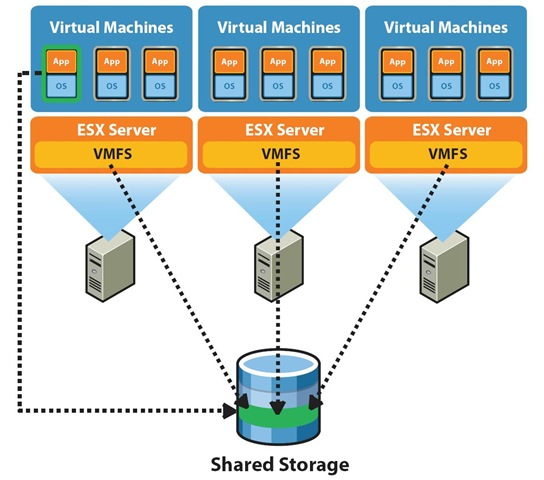
VMware hosts and shared storage diagram

ShoreTel fail over options using Vmware - Part 1 Building a VMware Test Lab!

, , ,
The most often asked question we hear among ShoreTel system administrators is how best to achieve "fail over", assure high availability and assure business continuity? There is no simple answer to this question nor is there any one "best practice".…
Cloud hosted PBX devices

Virtualize your ShoreTel Contact Center or ECC on ESXi?

, ,
Running the ECC on a virtual server is “not a supported configuration”, but will it work?  Often we encounter installed base solutions that are pushing the support envelop with market driven customer requirements.  Windows 7 may not be…
Oracle VirtualBox logo

Run ShoreTel on Vmware Player or Oracle VirtualBox!

, , ,
With the release of ShoreTel Version 4.2 the company introduced the concept of virtual appliances. These software objects, had the potential of replacing the Orange ShorGear hardward boxes that typically characterize a ShoreTel deployment. The…
Cloud hosted PBX devices

Deploying VoIP in the Cloud or rolling your own "hosted PBX" - Part 1 Server Deployement

, , ,
The entire subject of Virtualization and all things "cloud" has become something that even none technical people talk about.    You might say it has gone "viral" and captured the interest of geeks, business people, professional technology…

How DrVoIP built a VMware test lab to prove out redundancy and fail-over options before touching a production system.

The real configuration work behind running a contact center on ESXi, including the issues nobody documents upfront.

A practical look at testing and running core communications servers in a virtualized environment.

Why virtualization changed the economics of running your own communications infrastructure, on-premise or in the cloud.

ShoreTel Fail Over Options Using VMware, Part 1: Building a VMware Test Lab

Virtualize Your ShoreTel Contact Center or ECC on ESXi?

Run ShoreTel on VMware Player or Oracle VirtualBox

Deploying VoIP in the Cloud or Rolling Your Own Hosted PBX, Part 1: Server Deployment

Virtualization

Virtualization

Virtualization

Cloud Architecture


Ready to figure out where your infrastructure should actually run?

Book a strategy call and we'll walk through what you're running today and give you an honest recommendation on AWS, VMware/Hyper-V, or hybrid, before you commit to anything.